Transcribe WhatsApp Audio Messages in Seconds
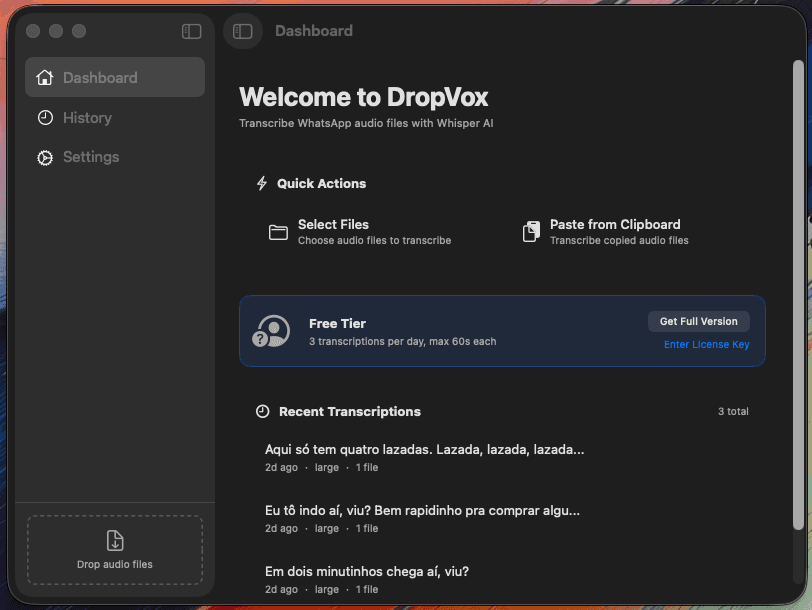
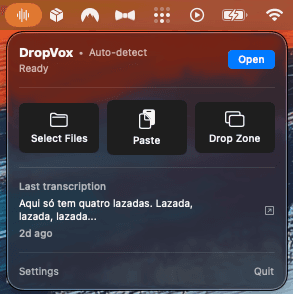
DropVox is a native macOS app that converts voice messages to text using WhisperKit AI. Full app window, menu bar access, and floating drop zone. Works offline, supports 13 languages, and never uploads your audio anywhere.
Free to start — Pro unlocks unlimited transcriptions
Requires macOS 14+ (Sonoma) • Apple Silicon • 75MB-3GB for AI models
Everything you need
A complete transcription solution with multiple ways to work: full app window, menu bar, keyboard shortcuts, and drag-and-drop.
WhisperKit AI
Uses WhisperKit optimized for Apple Silicon. Choose from 5 models (75MB-3GB). No internet required after setup.
13 Languages
Auto-detect or choose: Portuguese, English, Spanish, French, German, Chinese, Japanese, Korean, and more.
Full App Window
Dashboard with quick actions, history browser with search, and settings. Not just a menu bar app anymore.
Cmd+V Paste
Copy audio files in Finder, press Cmd+V in DropVox. Instant transcription with results auto-copied to clipboard.
Drop Zone
Floating window for drag-and-drop. Keep it visible while browsing files. Toggle with Cmd+D.
History Browser
Full history of all transcriptions with search. View details, copy text, see which model was used.
Model Selection
Choose accuracy vs speed: Tiny (75MB, fastest) to Large (3GB, most accurate). Download only what you need.
100% Private
Your audio never leaves your Mac. No cloud, no accounts, no data collection. Everything runs locally.
How it works
Three ways to transcribe your audio files - use whichever fits your workflow.
Download & Install
Download the DMG, drag DropVox to Applications. On first run, choose and download an AI model (75MB-3GB).
Transcribe Your Way
Use the main window, click the menu bar icon, press Cmd+V to paste, or drag files to the Drop Zone. Supports .opus, .mp3, .m4a, and .wav.
Get Your Text
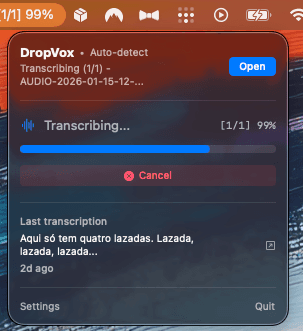
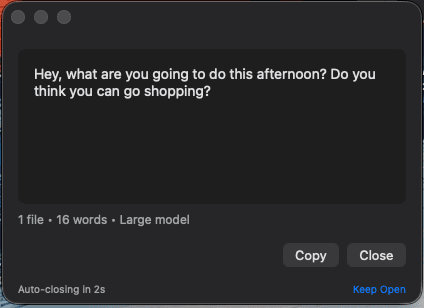
Watch real-time progress. Text is automatically copied to clipboard and saved to history. Optionally view results in a floating window.
Why DropVox?
See how DropVox compares to other transcription tools.
Privacy First
100% local processing. Your audio never leaves your Mac. No cloud, no accounts.
Most alternatives upload audio to cloud servers for processing.
One-Time Price
Pay once ($9.99), use forever. No recurring fees. All v1.x updates included.
Competitors charge $5-15/month. That's $60-180/year for the same features.
WhatsApp Optimized
Native .opus support — the format WhatsApp uses. No conversion needed. Just drag and drop.
Most tools don't support .opus, requiring manual audio conversion first.
Native Swift App
Built with SwiftUI for macOS. Lightweight, fast, integrates with menu bar and system shortcuts.
Many alternatives are Electron-based web wrappers that consume more memory and battery.
One-time price. No subscription. No hidden fees.
Get Pro for $9.99Your privacy matters
DropVox runs entirely on your Mac. Your audio files are processed locally using WhisperKit, Apple's optimized implementation of Whisper AI. No cloud uploads, no accounts required, no data collection. Ever.
What users are saying
Join hundreds of users who save time every day with DropVox.
“I get dozens of WhatsApp voice messages daily. DropVox saves me at least 30 minutes every day. The transcription quality with the Medium model is incredible.”
Maria S.
Marketing Manager
“Finally, an app that respects my privacy. Everything runs locally on my Mac, no cloud nonsense. The one-time price is a steal compared to subscription alternatives.”
James T.
Software Engineer
“The drop zone feature is a game changer. I keep it floating on my desktop and just drag audio files in. Results are instant and auto-copied to clipboard.”
Ana L.
Content Creator
Start free. Go Pro when you're ready.
No commitment required. Try DropVox free, upgrade when you need more.
Free
- 3 transcriptions per day
- 60 second max per file
- Base Whisper model only
Pro
- Unlimited transcriptions
- No audio length limit
- All 5 Whisper models
Ready to go Pro?
Unlock unlimited transcriptions, all Whisper models, and no audio length limits.
v1.0.0 • macOS 14+ (Sonoma) • Apple Silicon
Stay in the loop
Get notified about new features, tips, and special offers. No spam, unsubscribe anytime.